Lab-1-6
(2% of the course mark)
Express.js API Helmet Lab
- This lab focuses on integrating Helmet, a security middleware for Express.js applications, to enhance security by setting various HTTP headers.
Lab objectives
-
Understand the purpose and benefits of using Helmet in Express.js applications.
-
Successfully integrate Helmet into an Express.js application.
-
Configure different Helmet modules to set appropriate HTTP headers.
-
Identify and mitigate common security vulnerabilities using Helmet.
-
Test the application to ensure headers are correctly set and security is enhanced.
Create Node.js Express app
-
Open VSCode and create a folder named Express-API-HELMET.
-
Open the terminal and change the directory to Express-API-HELMET.
-
Initialize the app by running the following command:
npm init -y
- Install typescript by running the following commands:
npm install typescript -D
npm install @types/node -D
- Initialize tsconfig.json by running the following command:
npx tsc --init
-
Modify tsconfig.json and uncomment outDir.
-
Modify tsconfig.json and add the following property:
"removeComments": true
- Install nodemon by running the following command:
npm install nodemon -D
- Install dotenv by running the following command:
npm install dotenv
- Create an .env file in the root of your project and enter the following.
PORT=3000
- Install express by running the following commands:
npm install express
npm install @types/express -D
- Configure package.json by adding a new entry to the scripts property.
"build": "tsc",
"start": "nodemon ./dist/index",
- Configure package.json by adding a new property.
"type": "module"
- Install helmet by running the following command:
npm install helmet
npm install @types/helmet -D
- Create a file named index.ts and add the following code:
// Developer:
// Purpose:

import * as dotenv from "dotenv";
dotenv.config();

import express, { type Request, type Response } from "express";
import Helmet from "helmet";

const PORT: number = process.env.PORT ? parseInt(process.env.PORT) : 3000;
const app = express();

// Use the helmet middleware
app.use(Helmet());

app.get("/", (req: Request, res: Response) => {
  res.json({ message: "Helmet middleware demo..." });
});

app.all("/{*catchAll}", (req: Request, res: Response) => {
  res.status(404).json({
    message: `Invalid route (${req.url}) or HTTP method (${req.method}).`,
  });
});

app.listen(PORT, () => {
  console.log(`Server is running at http://localhost:${PORT}`);
  process.on("SIGTERM", shutdown);
  process.on("SIGINT", shutdown);
});

function shutdown() {
  console.log(`Server is shutting down.`);
  process.exit(0);
}
- Build the app by running the following command:
npm run build
- Start the app by running the following command:
npm run start
Verify that your Express app starts without errors before proceeding to the next step.
Browser testing
- Ensure that helmet is disabled by commenting the following code:
// import Helmet from "helmet";
// app.use(Helmet());
- Build the app by running the following command:
npm run build
-
Open your browser and navigate to: http://localhost:3000.
-
Open the browser's Developer Tools, click on the Network tab, and refresh the page.
-
Click on localhost and Headers tab.
-
Scroll and expand the Response Headers section. Take a screenshot and save it as browser-no-helment.png.
- Ensure that helmet is enabled by uncommenting the following code:
import Helmet from "helmet";
app.use(Helmet());
- Build the app by running the following command:
npm run build
-
Refresh the page once again.
-
Click on localhost and Headers tab.
-
Scroll and expand the Response Headers section. Take a screenshot and save it as browser-with-helment.png.
-
Compare the results from both screenshots, what conclusions can you draw? Take note of your conclusion, as you will need to write it in the Comments text area when submitting this lab.
Testing setup with vitest
- Install vitest by running the following command:
npm install vitest -D
- Configure package.json by updating the test entry of the scripts property.
"test": "vitest run",
- Modify tsconfig.json by adding the following property at the bottom of the file:
"exclude": ["dist", "node_modules", "index.test.ts"]
- In the root folder of the app, create a file named index.test.ts and add the following code:
// Developer:
// Purpose:

import { describe, it, expect } from "vitest";

// Server to test
const SERVER_URL = "http://localhost:3000";

// Test plan to verify Helmet security response headers
describe("Helmet security response headers", () => {
  it('Should set X-DNS-Prefetch-Control header to "off"', async () => {
    const res = await fetch(SERVER_URL);
    expect(res.headers.get("x-dns-prefetch-control")).toBe("off");
  });

  it('Should set X-Frame-Options header to "SAMEORIGIN"', async () => {
    const res = await fetch(SERVER_URL);
    expect(res.headers.get("x-frame-options")).toBe("SAMEORIGIN");
  });

  it("Should set Strict-Transport-Security header", async () => {
    const res = await fetch(SERVER_URL);
    expect(res.headers.get("strict-transport-security")).toMatch(
      /max-age=\d+; includeSubDomains/
    );
  });

  it('Should set X-Content-Type-Options header to "nosniff"', async () => {
    const res = await fetch(SERVER_URL);
    expect(res.headers.get("x-content-type-options")).toBe("nosniff");
  });

  it('Should set X-Permitted-Cross-Domain-Policies header to "none"', async () => {
    const res = await fetch(SERVER_URL);
    expect(res.headers.get("x-permitted-cross-domain-policies")).toBe("none");
  });

  it('Should set Referrer-Policy header to "no-referrer"', async () => {
    const res = await fetch(SERVER_URL);
    expect(res.headers.get("referrer-policy")).toBe("no-referrer");
  });
});
- Ensure that helmet is disabled by commenting the following code:
// import Helmet from "helmet";
// app.use(Helmet());
- Build the app by running the following command:
npm run build
- Open a new terminal window and run the following command:
npm run test
- Take a screenshot of the result and save it as vitest-no-helmet.png.
- Ensure that helmet is enabled by uncommenting the following code:
import Helmet from "helmet";
app.use(Helmet());
- Build the app by running the following command:
npm run build
- Open a new terminal window and run the following command:
npm run test
-
Take a screenshot of the result and save it as vitest-with-helmet.png.
-
Compare the results from both screenshots, what conclusions can you draw? Take note of your conclusion, as you will need to write it in the Comments text area when submitting this lab.
Submission
- Create a folder named submit.
Delete the node_modules folder on any app that you are submitting.
-
Copy the Express-API-HELMET folder and all the screenshots (browser-no-helment.png, browser-with-helment.png, vitest-no-helmet.png and vitest-with-helmet.png) to the submit folder. Write your conclusions in the Comments text area.
-
Create a zip file of the submit folder.
-
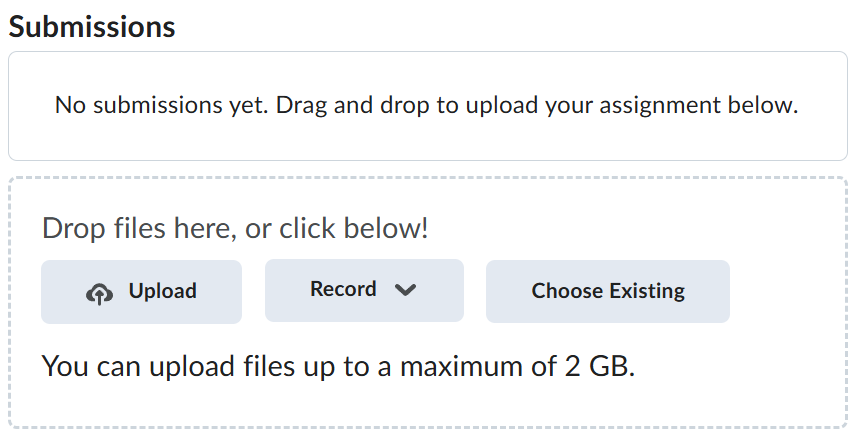
Navigate back to where the lab was originally downloaded, there should be a Submissions section (see below) where the zip file can be uploaded.