Lab-1-10
(2% of the course mark)
Express.js API Rate Limit Lab
- In this lab, students will learn how to implement rate limiting in a Node.js application using the Express framework. Rate limiting is a technique used to control the number of requests a user can make to a server in a given timeframe. This helps protect the server from being overwhelmed by too many requests and enhances security by mitigating potential abuse or denial-of-service attacks.
Lab objectives
-
Understand the concept and importance of rate limiting in web applications.
-
Integrate a rate-limiting middleware into an Express application.
-
Configure rate-limiting rules to control request rates effectively.
-
Test and validate the rate-limiting functionality to ensure it works as expected.
Create Node.js Express app
-
Open VSCode and create a folder named Express-API-RATE-LIMIT.
-
Open the terminal and change the directory to Express-API-RATE-LIMIT.
-
Initialize the app by running the following command:
npm init -y
- Install typescript by running the following commands:
npm install typescript -D
npm install @types/node -D
- Initialize tsconfig.json by running the following command:
npx tsc --init
-
Modify tsconfig.json and uncomment outDir.
-
Modify tsconfig.json and add the following property:
"removeComments": true
- Install nodemon by running the following command:
npm install nodemon -D
- Install dotenv by running the following command:
npm install dotenv
- Create an .env file in the root of your project and enter the following.
PORT=3000
- Install express by running the following commands:
npm install express
npm install @types/express -D
- Configure package.json by adding a new entry to the scripts property.
"build": "tsc",
"start": "nodemon ./dist/index",
- Configure package.json by adding a new property.
"type": "module"
- Install rate-limit by running the following commands:
npm install express-rate-limit
npm install @types/express-rate-limit -D
-
In the root folder of the app, create a folder named middlewares.
-
In the middlewares folder, create a file named rateLimit.ts and add the following code:
import expressRateLimit from "express-rate-limit";

export const expressRateLimitFactory = (
  MAX_REQUESTS: number,
  WINDOW_MS: number
) => {
  return expressRateLimit({
    windowMs: WINDOW_MS,
    max: MAX_REQUESTS,
    message: {
      message: `Too many requests from this IP. ${getServiceInformation(
        MAX_REQUESTS,
        WINDOW_MS
      )}, please try again later.`,
    },
  });
};

export function getServiceInformation(MAX_REQUESTS: number, WINDOW_MS: number) {
  return `Maximum of ${MAX_REQUESTS} requests within a ${
    WINDOW_MS / (60 * 1000)
  } minute window.`;
}
- Create a file named index.ts and add the following code:
// Developer:
// Purpose:

import * as dotenv from "dotenv";
dotenv.config();

import express, { type Request, type Response } from "express";

const PORT: number = process.env.PORT ? parseInt(process.env.PORT) : 3000;
const MAX_REQUESTS: number = process.env.MAX_REQUESTS
  ? parseInt(process.env.MAX_REQUESTS)
  : 10;
const WINDOW_MS: number = process.env.WINDOW_MS
  ? parseInt(process.env.WINDOW_MS)
  : 900000; // 15 Minutes

const app = express();

import {
  expressRateLimitFactory,
  getServiceInformation,
} from "./middlewares/rateLimit.js";

app.use(expressRateLimitFactory(MAX_REQUESTS, WINDOW_MS));

app.get("/", (req: Request, res: Response) => {
  res.json({
    message: `Express Api Rate Limit Demo. ${getServiceInformation(
      MAX_REQUESTS,
      WINDOW_MS
    )}.`,
  });
});

app.all("/{*catchAll}", (req: Request, res: Response) => {
  res.status(404).json({
    message: `Invalid route (${req.url}) or HTTP method (${req.method}).`,
  });
});

app.listen(PORT, () => {
  console.log(`Server is running at http://localhost:${PORT}`);
  process.on("SIGTERM", shutdown);
  process.on("SIGINT", shutdown);
});

function shutdown() {
  console.log(`Server is shutting down.`);
  process.exit(0);
}
- Build the app by running the following command:
npm run build
- Start the app by running the following command:
npm run start
Verify that your Express app starts without errors before proceeding to the next step.
Rate limit testing
-
Open the browser's Developer Tools, click on the Network tab, and navigate to: http://localhost:3000.
-
Click on localhost and Headers tab.
-
Scroll and expand the Response Headers section, keep on scrolling until the following headers are visible:
-
x-powered-by
-
x-ratelimit-limit
-
x-ratelimit-remaining
-
x-ratelimit-reset
-
-
Take a screenshot and save it as rate-limit-01.png.
-
With the Develoer tools open, refresh the page and repeat steps 2 and 3.
-
Take a screenshot and save it as rate-limit-02.png.
-
Compare the results from both screenshots, what conclusions can you draw? Take note of your conclusion, as you will need to write it in the Comments text area when submitting this lab.
-
Refresh the page until you see the output below.
{
  "message": "Too many requests from this IP. Maximum of 10 requests within a 15 minute window., please try again later."
}
-
What for at least 15 minutes and refresh the page and repeat steps 2 and 3.
-
Take a screenshot and save it as rate-limit-03.png.
-
Using the previous screenshot, what conclusions can you draw? Take note of your conclusion, as you will need to write it in the Comments text area when submitting this lab.
Submission
- Create a folder named submit.
Delete the node_modules folder on any app that you are submitting.
-
Copy the Express-API-RATE-LIMIT folder and all the screenshots (rate-limit-01.png, rate-limit-02.png, and rate-limit-03.png) to the submit folder. Write your conclusions in the Comments text area.
-
Create a zip file of the submit folder.
-
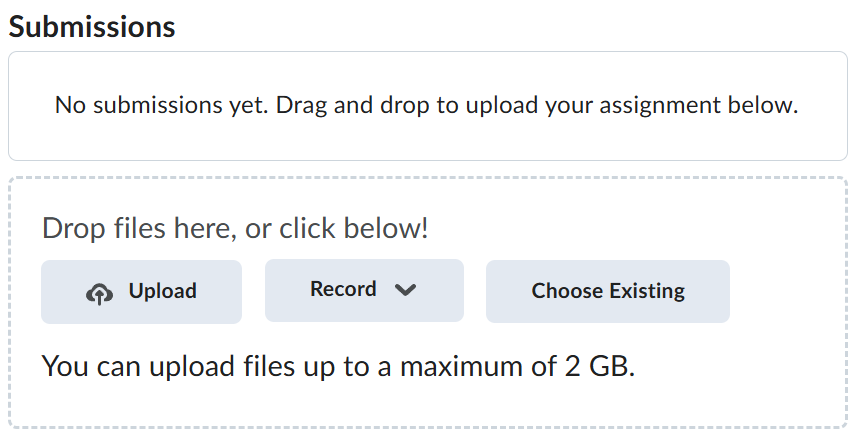
Navigate back to where the lab was originally downloaded, there should be a Submissions section (see below) where the zip file can be uploaded.