Lab-1-3
(2% of the course mark)
Express.js API MVC Lab
- In this lab, you will build a RESTful API using Express.js following the MVC (Model-View-Controller) design pattern. You will learn how to organize your project into routes, controllers, services, and models to write clean, maintainable, and scalable code.
Lab objectives
-
Set up an Express.js project with TypeScript.
-
Structure a project using the MVC design pattern.
-
Create routes, controllers, services, and models.
-
Handle requests and responses using Express.js.
-
Apply separation of concerns to keep code clean and maintainable.
Create Node.js Express app
-
Open VSCode and create a folder named Express-API-MVC.
-
Open the terminal and change the directory to Express-API-MVC.
-
Initialize the app by running the following command:
npm init -y
- Install typescript by running the following commands:
npm install typescript -D
npm install @types/node -D
- Initialize tsconfig.json by running the following command:
npx tsc --init
-
Modify tsconfig.json and uncomment outDir.
-
Modify tsconfig.json and add the following property:
"removeComments": true
- Install nodemon by running the following command:
npm install nodemon -D
- Install dotenv by running the following command:
npm install dotenv
- Create an .env file in the root of your project and enter the following.
PORT=3000
- Install express by running the following commands:
npm install express
npm install @types/express -D
- Configure package.json by adding a new entry to the scripts property.
"build": "tsc",
"start": "nodemon ./dist/index",
- Configure package.json by adding a new property.
"type": "module"
- Create a file named index.ts and add the following code:
// Developer:
// Purpose:

import * as dotenv from "dotenv";
dotenv.config();

import express, { type Request, type Response } from "express";

const PORT: number = process.env.PORT ? parseInt(process.env.PORT) : 3000;
const app = express();

app.all("/{*catchAll}", (req: Request, res: Response) => {
  res.status(404).json({
    message: `Invalid route (${req.url}) or HTTP method (${req.method}).`,
  });
});

app.listen(PORT, () => {
  console.log(`Server is running at http://localhost:${PORT}`);
  process.on("SIGTERM", shutdown);
  process.on("SIGINT", shutdown);
});

function shutdown() {
  console.log(`Server is shutting down.`);
  process.exit(0);
}
- Build the app by running the following command:
npm run build
- Start the app by running the following command:
npm run start
Verify that your Express app starts without errors before proceeding to the next step.
Express app MVC
-
In the root folder of the app, create a folder named lib.
-
In the lib folder, create a file named utils.ts and add the following code:
// Developer:
// Purpose:

import { randomUUID } from "crypto";

export const generateId = () => randomUUID();
-
In the root folder of the app, create a folder named models.
-
In the models folder, create a file named userModel.ts and add the following code:
// Developer:
// Purpose:

import { generateId } from "../lib/utils.js";

export interface User {
  id: string;
  name: string;
}

const users: User[] = [];

export const UserModel = {
  findAll: (): User[] => users,

  findById: (id: string): User | undefined => users.find((u) => u.id === id),

  create: (name: string): User => {
    const newUser = { id: generateId(), name };
    users.push(newUser);
    return newUser;
  },

  update: (id: string, name: string): User | undefined => {
    const user = users.find((u) => u.id === id);
    if (user) user.name = name;
    return user;
  },

  delete: (id: string): boolean => {
    const index = users.findIndex((u) => u.id === id);
    if (index === -1) return false;
    users.splice(index, 1);
    return true;
  },
};
-
In the root folder of the app, create a folder named services.
-
In the services folder, create a file named userService.ts and add the following code:
// Developer:
// Purpose:

import { UserModel } from "../models/userModel.js";

export const UserService = {
  getAll: () => UserModel.findAll(),
  getById: (id: string) => UserModel.findById(id),
  create: (name: string) => UserModel.create(name),
  update: (id: string, name: string) => UserModel.update(id, name),
  delete: (id: string) => UserModel.delete(id),
};
-
In the root folder of the app, create a folder named controllers.
-
In the controllers folder, create a file named userController.ts and add the following code:
// Developer:
// Purpose:

import { type Request, type Response } from "express";
import { UserService } from "../services/userService.js";

export const UserController = {
  getAll: (req: Request, res: Response): void => {
    res.json(UserService.getAll());
  },

  getById: (req: Request, res: Response): void => {
    const user = UserService.getById(String(req.params.id));
    user ? res.json(user) : res.status(404).json({ message: "User not found" });
  },

  create: (req: Request, res: Response): void => {
    const { name } = req.body;
    if (!name) {
      res.status(400).json({ message: "Name is required" });
      return;
    }
    res.status(201).json(UserService.create(name));
  },

  update: (req: Request, res: Response): void => {
    const { name } = req.body;
    const user = UserService.update(String(req.params.id), name);
    user ? res.json(user) : res.status(404).json({ message: "User not found" });
  },

  delete: (req: Request, res: Response): void => {
    const deleted = UserService.delete(String(req.params.id));
    deleted
      ? res.status(204).send()
      : res.status(404).json({ message: "User not found" });
  },
};
-
In the root folder of the app, create a folder named routes.
-
In the routes folder, create a file named userRouter.ts and add the following code:
// Developer:
// Purpose:

import { Router } from "express";
import { UserController } from "../controllers/userController.js";

const router = Router();

router.get("/", UserController.getAll);
router.get("/:id", UserController.getById);
router.post("/", UserController.create);
router.put("/:id", UserController.update);
router.delete("/:id", UserController.delete);

export default router;
- Update index.ts and add the following code:
// Developer:
// Purpose:

import * as dotenv from "dotenv";
dotenv.config();

import express, { type Request, type Response } from "express";

const PORT: number = process.env.PORT ? parseInt(process.env.PORT) : 3000;

import userRouter from "./routes/userRouter.js";

const app = express();

app.use(express.json());
app.use("/api/users", userRouter);

app.all("/{*catchAll}", (req: Request, res: Response) => {
  res.status(404).json({
    message: `Invalid route (${req.url}) or HTTP method (${req.method}).`,
  });
});

app.listen(PORT, () => {
  console.log(`Server is running at http://localhost:${PORT}`);
  process.on("SIGTERM", shutdown);
  process.on("SIGINT", shutdown);
});

function shutdown() {
  console.log(`Server is shutting down.`);
  process.exit(0);
}
Test create
-
Open Postman, click File > New... > HTTP.
-
Set the HTTP method to POST and the URL to http://localhost:3000/api/users.
-
Select Body, then raw, and then JSON.
-
Set the Body to:
{
    "name": "Sam Altman"
}
-
Click on Send. Take a screenshot and save it as post.png.
-
Take note of the id, as it will be used in subsequent requests.
Test read
-
Open Postman, click File > New... > HTTP.
-
Set the HTTP method to GET and the URL to http://localhost:3000/api/users.
-
Click on Send. Take a screenshot and save it as get-all.png.
-
Set the HTTP method to GET and the URL to http://localhost:3000/api/users/id, where id is the id of the previously created item.
-
Click on Send. Take a screenshot and save it as get-one.png.
Test update
-
Open Postman, click File > New... > HTTP.
-
Set the HTTP method to PUT and the URL to http://localhost:3000/api/users/id, where id is the id of the previously created item.
-
Select Body, then raw, and then JSON.
-
Set the Body to:
{
    "name": "Steve Jobs"
}
- Click on Send. Take a screenshot and save it as put.png.
Test delete
-
Open Postman, click File > New... > HTTP.
-
Set the HTTP method to DELETE and the URL to http://localhost:3000/api/users/id, where id is the id of the previously created item.
-
Click on Send. Take a screenshot and save it as delete.png.
Modify Express app MVC
- Modify Express-API-MVC app and create new route, controller, service, and model to support the following:
export interface Department {
  id: string;
  name: string;
  description: string;
}
Submission
- Create a folder named submit.
Delete the node_modules folder on any app that you are submitting.
-
Copy the Express-API-MVC folder and all the screenshots (post.png, get.png, put.png, and delete.png) to the submit folder.
-
Create a zip file of the submit folder.
-
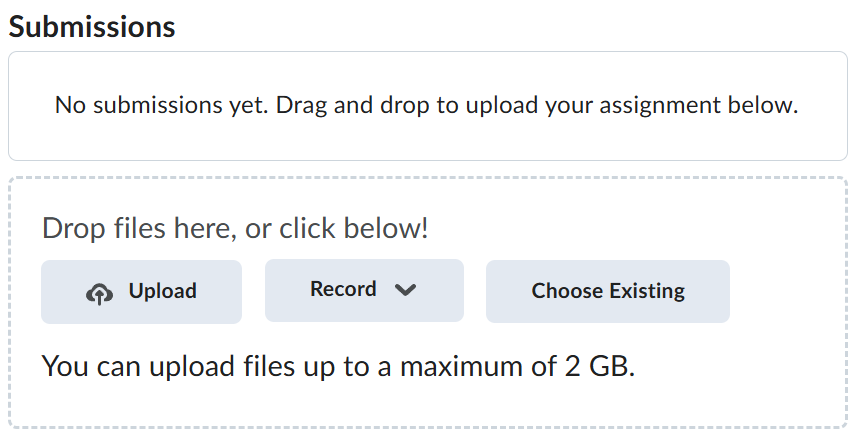
Navigate back to where the lab was originally downloaded, there should be a Submissions section (see below) where the zip file can be uploaded.